About the Percentage Change Calculator
Percentage change shows how much a value has changed relative to its original value.
A positive percentage change represents an increase. A negative percentage change represents a decrease.
Calculate the percentage change from an original value to a new value, including the signed increase or decrease.
Log in or create a free account to save your inputs and results, so you don't have to enter them again next time.🔒 No spam, ever. We never sell or share your details, and you can delete your history or account at any time. Privacy policy
Fill in the details and click Calculate to see your results.
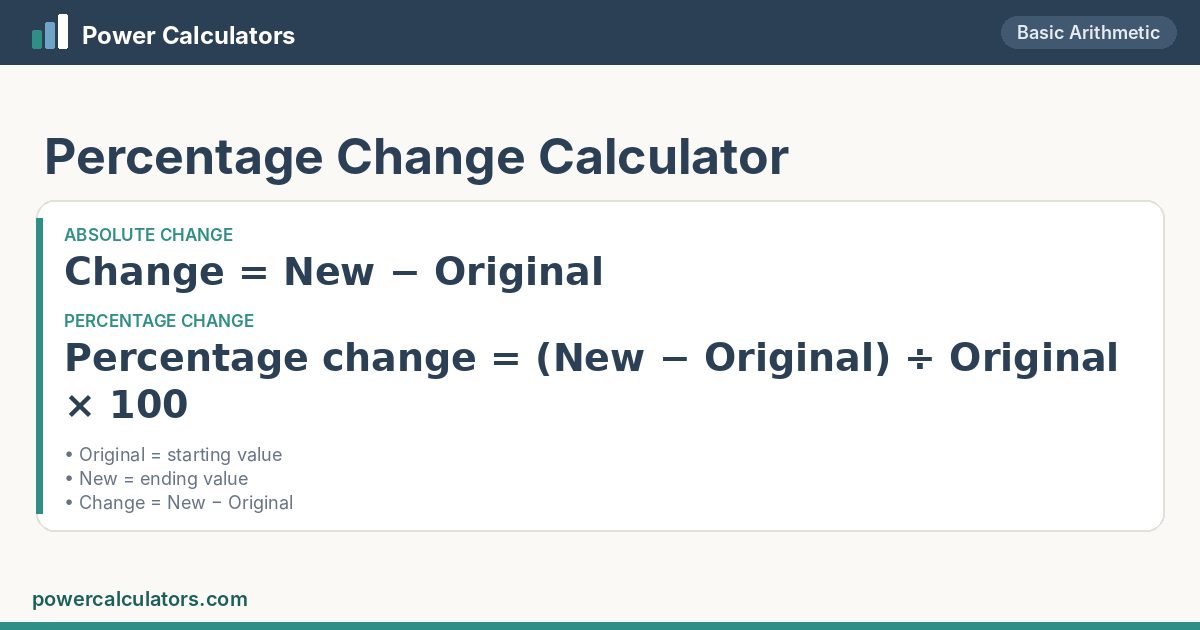
Percentage change shows how much a value has changed relative to its original value.
A positive percentage change represents an increase. A negative percentage change represents a decrease.
| Original Value | 100 |
| New Value | 120 |
| Percentage increase | 20% |
| Change | +20 |
| Working | (120 − 100) ÷ 100 × 100 = 20% |
| New value as % of original | 120% |
| Multiplier | × 1.2 |
| To get back to 100 | -16.6667% change needed |
20%.
| Original Value | 200 |
| New Value | 150 |
| Percentage decrease | 25% |
| Change | -50 |
| Working | (150 − 200) ÷ 200 × 100 = -25% |
| New value as % of original | 75% |
| Multiplier | × 0.75 |
| To get back to 200 | +33.3333% change needed |
25%.
| Original Value | 45000 |
| New Value | 52000 |
| Percentage increase | 15.555556% |
| Change | +7000 |
| Working | (52000 − 45000) ÷ 45000 × 100 = 15.555556% |
| New value as % of original | 115.55556% |
| Multiplier | × 1.1555556 |
| To get back to 45000 | -13.4615% change needed |
15.555556%.
It is the difference between the new and original values divided by the original value, multiplied by 100.
It means the new value is lower than the original value.
No. Percentage change uses the original value as the reference, while percentage difference uses the average magnitude of the two values.
Subtract the old value from the new value, divide by the old value and multiply by 100. 120 vs 100: (120 − 100) ÷ 100 × 100 = 20%.